I often solve equations of the form f(x) = g(x) by graphing y = f(x) and y = g(x) on the Cartesian plane and looking for any points of intersection. The Sine of the Times blog shows a way to investigate these equations without jumping to a second dimension and introducing y. The post is well worth a read.
Thursday, June 2, 2022
Friday, October 26, 2018
The Orthocircle. Who knew?
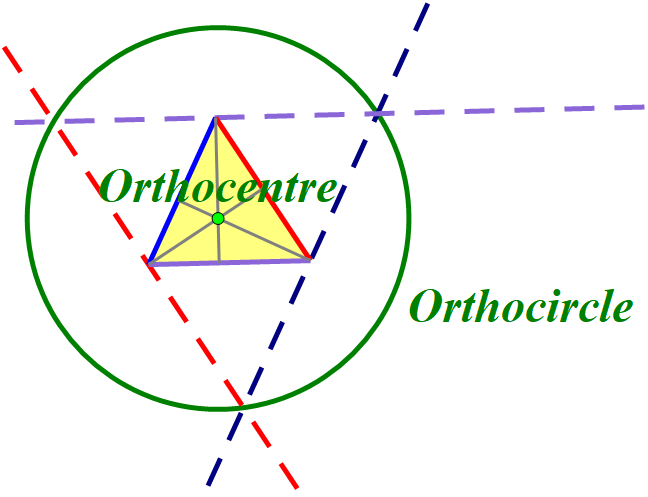
I have been writing some support materials for the yet to be released Pattern Blocks+ mathies tool. I received feedback that many elementary teachers would not be familiar with the term "altitude", much less "orthocentre". It occured to me, that I knew about the incentre and incircle, the circumcentre and circumcircle, but couldn't recall ever constructing an orthocircle.
I read Math is Fun's Triangle Centers page and loved the visuals and interactive sketches, but they did not include an orthocircle. The page says that there are actually thousands of "centres" of a triangle, and I wonder if "interior points" was what was meant.
After a little more surfing, I wrote the following:
The three altitudes of a triangle always intersect in a single point called the orthocentre of the triangle. This point is the centre of a circle that can be constructed by creating a triangle with sides parallel to the original triangle through its vertices (see below).
It was nice to dust off The Geometer's Sketchpad again.
Is the orthocircle as new to you as it was to me?
Is what I have written accurate or is it better to say that this is one of many orthocircles?
My 11th blog anniversary went by on the 23rd.
Labels:
altitude,
anticomplementary,
block,
centre,
height,
mathies,
medial,
orthocenter,
orthocentre,
orthocircle,
pattern,
sketchpad,
triangle
Thursday, May 18, 2017
Exploring Area and Perimeter
At the RMS Spring Symposium, Dr. Christine Suurtamm used the following scenario as a springboard to talk about Math content knowledge and pedagogical content knowledge (i.e., what is important mathematically and how to help a student learn about it).
There was lots of rich discussion. It made me think about taking three sides of a polygon and moving the middle side out. Here the right side of the square has been moved out to make a rectangle with larger area and larger perimeter. I called this "extrusion" but am not sure that is mathematically correct and became uninterested in whether the new side was parallel to the old one.
For a simple quadrilateral, it makes sense to me that as you move the middle side out, the area gets bigger.
To keep the notation friendlier, let's call newA "C" and newB "D".
The perimeter looks like it is getting bigger (i.e., that AC + CD + DB is bigger than AB) but I wondered if the decrease in CD might be bigger than the increase along the ray formed by the containing sides (AC + DB).
My buddy Greg used a triangle inequality argument to convince me that the perimeter gets bigger. The triangle inequality is a fancy way of saying that the shortest distance between two points is a line. Here the distance from A to D is shortest along the line, going via C is longer.
AC + CD > AD
Similarly, looking at triangle ABD,
AD + DB > AB
Putting it together,
AC + CD + DB > AD + DB > AB
So the new perimeter is bigger than the old one.
I started to feel smug and accomplished and then I thought about a counter-example,
As a teacher, where would you go with this?
There was lots of rich discussion. It made me think about taking three sides of a polygon and moving the middle side out. Here the right side of the square has been moved out to make a rectangle with larger area and larger perimeter. I called this "extrusion" but am not sure that is mathematically correct and became uninterested in whether the new side was parallel to the old one.
For a simple quadrilateral, it makes sense to me that as you move the middle side out, the area gets bigger.
To keep the notation friendlier, let's call newA "C" and newB "D".
The perimeter looks like it is getting bigger (i.e., that AC + CD + DB is bigger than AB) but I wondered if the decrease in CD might be bigger than the increase along the ray formed by the containing sides (AC + DB).
My buddy Greg used a triangle inequality argument to convince me that the perimeter gets bigger. The triangle inequality is a fancy way of saying that the shortest distance between two points is a line. Here the distance from A to D is shortest along the line, going via C is longer.
AC + CD > AD
Similarly, looking at triangle ABD,
AD + DB > AB
Putting it together,
AC + CD + DB > AD + DB > AB
So the new perimeter is bigger than the old one.
I started to feel smug and accomplished and then I thought about a counter-example,
As a teacher, where would you go with this?
Labels:
area,
Content,
inequality,
Knowledge,
Pedagogical,
Perimeter,
RMSOntario,
triangle
Monday, May 15, 2017
Another visualization task
Here is another interesting setup, shared in Tom Steinke's OAME 2017 session. I have seen circles around squares and circles inside squares, but not circles and squares sharing a baseline.
I think a student could do a lot of productive reasoning about what the situation would look like prior to using the interactive sketch.
- What does the rectangle look like at the extremes?
- Will the side be greater than or less than the diameter?
- What fraction of the side length of the square do you think the diameter will be?
Opening the sketch and dragging the point, without showing the measurements, is interesting. How close is a student's guess about where the position of the drag point must be for the rectangle to be a square? How close is there estimation of the relationship between the square's side and the diameter?
Lastly, they could choose an arbitrary diameter, like 100, and see if they can verify the result. Surprisingly, everything comes out nice and evenly with narry a square root of two in sight!
Friday, May 12, 2017
Slanty Squares
I attended a well-crafted session with Kit Luce yesterday. She handed out a square and asked us what questions it brought to mind. One participant wondered if the green square was half of the total. I thought that was interesting and also thought that the green area was clearly more than a half.
I took the rather woeful photo above, imported it into the mathies Notepad Tool, and used a grid to estimate the areas. I was surprised that the green area seemed to be significantly less that one-half.
I then turned to Sketchpad to model the situation. Apparently, Blogger doesn't let me use an iframe to embed a web sketch at a regular http:// address, so you have to visit the interactive sketch in its own window.
What is special about the place where the green square is exactly one-half of the area?
Do you find this as counter-intuitive as I do?
I then turned to Sketchpad to model the situation. Apparently, Blogger doesn't let me use an iframe to embed a web sketch at a regular http:// address, so you have to visit the interactive sketch in its own window.
What is special about the place where the green square is exactly one-half of the area?
Do you find this as counter-intuitive as I do?
A parti at OAME 2017
Yesterday, Greg Clarke and I gave a session at OAME 2017, entitled "Reasoning and Proving with Relational Rods". Toward the end, we talked about partitions of a number and Young Diagrams. There are 297 partitions of 17, including:
- 17
- 16 + 1
- 15 + 2
- 15 + 1 + 1
- 2 + 1 + 1 + 1 + 1 + 1 + 1 + 1 + 1 + 1 + 1 + 1 + 1 + 1 + 1 + 1
- 1 + 1 + 1 + 1 + 1 + 1 + 1 + 1 + 1 + 1 + 1 + 1 + 1 + 1 + 1 + 1 + 1
There are only five partitions of 17 that have distinct odd parts:
- 17
- 13 + 3 + 1
- 11 + 5 + 1
- 9 + 7 + 1
- 9 + 5 + 3
A Young Diagram is an arrangement of squares, that corresponds to a partition. You can create Young-like diagrams using the Relational Rods+ and the Colour Tiles mathies Learning Tools.
A conjugate is a partition that you get when you flip the rows and the columns of its Young Diagram. For example, the conjugate of
17 = 9 + 5 + 3
is
17 = 3 + 3 + 3 + 2 + 2 + 1 + 1 + 1 + 1
Sometimes, when you create a conjugate of a partition, you get the same partition. That partition is called a self-conjugate. For example,
17 = 5 + 4 + 4 + 3 + 1
![]() |
| Using Relational Rods+ |
![]() |
| Using Colour Tiles (the colours are unnecessary) |
It turns out that there are five partitions of 17 that are self-conjugates. Can you find the other 4? It is more fun if you use Colour Tiles, since you have the reflection and rotate buttons.
In our session, Greg and I stated the theorem that:
The number of partitions with distinct odd parts
is the same as the number of self-conjugates.
For 17, that number is 5. We gave a way to create a self-conjugate from a partition with distinct odd parts (and vice-versa) which establishes a one-to-one correspondence. Can you see how the two sets of five are related?
See the article on which our talk was based on the less-accessible wikipedia article that gave us the idea for more details.
Wednesday, November 16, 2016
A little late to the US Election Party
You may have heard about the United States having an election recently. In fact, all the talk about Florida and racial divisions might have reminded you of other recent elections.
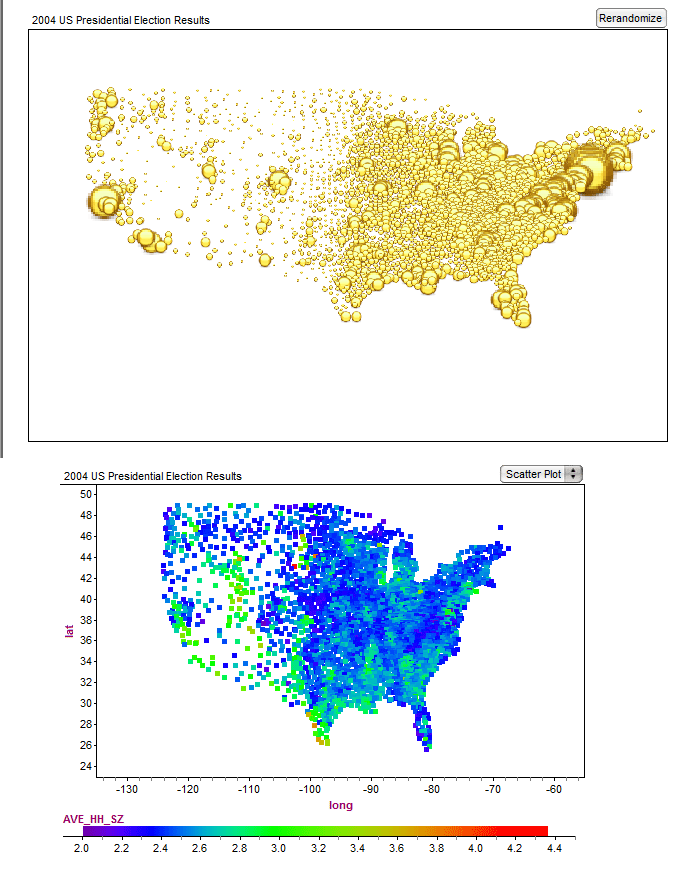
I spent some happy time after the 2004 election gathering data, by county, in a Fathom document. I was inspired by some fascinating articles with incredible data visualizations:
The changing colors of America (1960-2004)
Maps of the 2016 US presidential election results (it used to be 2004)
and posed a few questions on The Math Forum.
Fathom is licensed by the Ontario Ministry of Education for use in its publicly funded schools and Ontario has an innovative Data Management course at the Grade 12 level.
Here are two of the plots that I created in Fathom which I also think are very cool - not quite as fancy as the ones above however. These make you wonder where "middle America" has gone...

The comments related to the collection are worth a read.
I spent some happy time after the 2004 election gathering data, by county, in a Fathom document. I was inspired by some fascinating articles with incredible data visualizations:
The changing colors of America (1960-2004)
Maps of the 2016 US presidential election results (it used to be 2004)
and posed a few questions on The Math Forum.
Fathom is licensed by the Ontario Ministry of Education for use in its publicly funded schools and Ontario has an innovative Data Management course at the Grade 12 level.
Here are two of the plots that I created in Fathom which I also think are very cool - not quite as fancy as the ones above however. These make you wonder where "middle America" has gone...

The comments related to the collection are worth a read.
Tuesday, February 9, 2016
Tribute to Bob Elliott
My dad used to listen to Gilmour's Albums religiously - it was Sunday after all. Gilmour introduced me to Bob and Ray who I just loved. Bob Elliott died a week ago, so I am embedding two of my favorites as a tribute.
Smart - like Shakespearean Baseball
Using a CLIPS Activity in SMART Notebook - Redux
In a post from 2009, Giancarlo Brotto explained how to embed .swf downloads from MathCLIPS into SMART Notebook. This year, SMART Notebook will be moving away from Flash, and so Giancarlo has updated the video with three methods to embed CLIPS activities, games and tools into a Notebook file. He even added some promotion for other SMART products, I guess that is what you do if you are Global Education Strategist for SMART.
Friday, December 18, 2015
Creating a custom formula in Google Sheets to concatenate a range of values with a delimiter
In the past, I have written a little VBA to create an Excel function to do this. I use it to take a range of cells containing email addresses and make one string containing those addresses delimited by semi-colons suitable for pasting into the TO: field of an email.
Now that I am using Google Sheets more, I was curious if I could do a similar thing.
With a little investigation, I was able to go to Tools | Script Editor and enter the following:
Once it is saved I can invoke it from my Sheet using something like:
Notice that a range like C2:C25 is automatically converted by Sheets into a two dimensional array.
After successfully creating the function, I searched for a similar solution online and found that there are ways to do it that do not require a custom script - see
https://productforums.google.com/forum/?hl=en#!category-topic/docs/how-do-i/FQbzbVK4-i0 , however my script is illustrative if not elegant.
Now that I am using Google Sheets more, I was curious if I could do a similar thing.
With a little investigation, I was able to go to Tools | Script Editor and enter the following:
function CCAT(range, delimiter) {
var returnString = '';
var rows = range.length;
for (r=0; r<rows;r++){
var cols = range[r].length;
for (c=0; c<cols; c++){
returnString += range[r][c]+delimiter;
}
}
return returnString;
}
Once it is saved I can invoke it from my Sheet using something like:
=CCAT(C2:C25,";")
Notice that a range like C2:C25 is automatically converted by Sheets into a two dimensional array.
After successfully creating the function, I searched for a similar solution online and found that there are ways to do it that do not require a custom script - see
https://productforums.google.com/forum/?hl=en#!category-topic/docs/how-do-i/FQbzbVK4-i0 , however my script is illustrative if not elegant.
Wednesday, November 4, 2015
Scratch and Binomial Walks
I am at the #bit15 conference and attended the Coding and Math session with @georgegadanidis. We learned a little Scratch programming.
We did the requisite square and circle creation tasks. He had some nice connections to higher level math - including extending a two coin toss scenario to the binomial theorem. At that point, I worked on my program to make the cat do a binomial walk - not realizing that he would have that example later. I have shared my project at https://scratch.mit.edu/projects/86529699/ and embedded it below:
The cat should start moving when you click the green flag. In the offline Scratch editor, you can export the list of horizontal positions where 0 is the centre. I then imported it into Fathom to make a histogram.
Looks pretty binomial to me!
I am using Twitter as part of our #mmmmECOO presentation - my handle is @rossisen.
Thursday, June 11, 2015
How do I Construct these Loci?
If you have two points, A and B, in the plane and then determine a third point P by measuring the distances to the original two and having the sum of those distances constant, you define an ellipse.
PA + PB = k
Tracing out such a locus is a fairly standard thing that is done in Sketchpad by defining the sum as a segment, creating a point on the segment to partition the length in 2, creating a circle with each partition as a radius, and tracing out the intersections.
What if you have three points, A, B, and C, in the plane and then determine a fourth point P by measuring the distances to the original three and having the sum of those distances be a constant?
PA + PB + PC = k
Here, I have constructed the Fermat Point P[0] which is the point where the sum is a minimum. Then I traced out three points with the constant sum approximately 10, 12 and 14 units.
PA + PB = k
Tracing out such a locus is a fairly standard thing that is done in Sketchpad by defining the sum as a segment, creating a point on the segment to partition the length in 2, creating a circle with each partition as a radius, and tracing out the intersections.
What if you have three points, A, B, and C, in the plane and then determine a fourth point P by measuring the distances to the original three and having the sum of those distances be a constant?
PA + PB + PC = k
Here, I have constructed the Fermat Point P[0] which is the point where the sum is a minimum. Then I traced out three points with the constant sum approximately 10, 12 and 14 units.
I am looking for a more elegant way to trace out the locus corresponding to any given constant sum of distances to the vertices. I would also like to know what the curve is called and whether there is a way to graph a relation with that shape.
I am calling on the vast readership and commenters to help!
Labels:
circle,
distance,
ellipse,
fermat point,
geometer's,
geometry,
locus,
sketchpad
Tuesday, June 2, 2015
An Interactive Version of the Triangle Investigation
In the previous post, I captured movies of my investigation with The Geometer's Sketchpad. Web Sketchpad allows for including an HTML 5 version of the sketch on a webpage, like this one.
Drag the yellow dot, currently on the triangle to trace out the various positions and area of the triangle.
Note that I have enforced the maximum side length of 10 in a very strange way. Can you describe what I have done? Can you do it in a similar or better way?
Where do you have to place the yellow dot in order to have an area of 0?
How can you drag the yellow dot to keep the area the same?
What other patterns do you see in the behaviour? (There are lots more in the previous post)
Drag the yellow dot, currently on the triangle to trace out the various positions and area of the triangle.
Note that I have enforced the maximum side length of 10 in a very strange way. Can you describe what I have done? Can you do it in a similar or better way?
Where do you have to place the yellow dot in order to have an area of 0?
How can you drag the yellow dot to keep the area the same?
What other patterns do you see in the behaviour? (There are lots more in the previous post)
Labels:
area,
dynamic,
geometer's,
geometry,
html5,
sketchpad,
triangle,
web sketchpad
Thursday, May 21, 2015
Investigating Triangles
For some reason, I woke up this morning thinking about triangles. Particularly triangles with longest side 10 units. I thought that Sketchpad might be an interesting way to construct said triangles and investigate relationships between the lengths of the other two sides.
You can see that I ended up with a tan triangle on the left and a plot relating the two remaining side lengths. The following videos step you through the process of creating the sketch and using it to investigate some very interesting questions about the boundary of the region on the right, isosceles triangles, right triangles, and maximal areas.
In Ontario, students in the Grade 9 Applied Level are expected to do investigations like this, although they start with rectangles - which seems more complicated. They are expected to investigate figures with maximal area as well as 3D shapes.
You can download the sketch, but it is more fun to create it yourself. I have captured my investigation in case it helps in the 12 videos below. If you find that you have trouble motivating yourself to watch 12 fascinating videos, you could just watch the last one to get a sense of where the investigation ends up.
(You can click on the title to get the video in a new tab)
Constructing the Triangle
Constructing the Point representing Side Lengths
Constructing the x and y segments
Tracing the Side Lengths
Investigating the Region of Possible Side Lengths
Investigating the Boundaries of the Region
Reasoning about the Equations of the Boundaries
Investigating Isosceles Triangles
Investigating More Isosceles Triangles
Investigating Right Triangles
Triangle in a Circle
Investigating Area
You can see that I ended up with a tan triangle on the left and a plot relating the two remaining side lengths. The following videos step you through the process of creating the sketch and using it to investigate some very interesting questions about the boundary of the region on the right, isosceles triangles, right triangles, and maximal areas.
In Ontario, students in the Grade 9 Applied Level are expected to do investigations like this, although they start with rectangles - which seems more complicated. They are expected to investigate figures with maximal area as well as 3D shapes.
You can download the sketch, but it is more fun to create it yourself. I have captured my investigation in case it helps in the 12 videos below. If you find that you have trouble motivating yourself to watch 12 fascinating videos, you could just watch the last one to get a sense of where the investigation ends up.
(You can click on the title to get the video in a new tab)
Constructing the Triangle
Constructing the Point representing Side Lengths
Constructing the x and y segments
Tracing the Side Lengths
Investigating the Region of Possible Side Lengths
Investigating the Boundaries of the Region
Reasoning about the Equations of the Boundaries
Investigating Isosceles Triangles
Investigating More Isosceles Triangles
Investigating Right Triangles
Triangle in a Circle
Investigating Area
Friday, April 10, 2015
Two new Learning Tools available
The
Ministry Digital Resources Development team is delighted to announce that two
new apps, Money by Mathies and Notepad by Mathies, are now available at the App Store, the Google Play Store
and for Desktop.
Please visit www.mathies.ca/LearningTools.php
to access them.
There is also an email
list that you can subscribe to if you would like to receive updates about new
resources. Visit http://oame.on.ca/CLIPS/WhatsNewEmailList.html
or click the link at the top of the What’s New dialog inside http://mathclips.ca .
The
Money by Mathies app allows students to represent values using realistic coin
and bill images provided by the Royal Canadian Mint and the Bank of
Canada.
The Notepad by Mathies app allows
annotations to be made on top of blank, lined, isometric or grid backgrounds.
Supports,
including wiki pages with sample screen shots, can be accessed using the i button in each app or from http://mathclips.wikispaces.com/MathCLIPS+Tools
.
Labels:
Android,
annotation,
apps,
canadian,
iOS,
learning tools,
math,
mathclips,
mathies,
money,
notepad,
representations,
tools
American Politics Explained
I just think that this is so right-on and funny to boot!
Yoram Bauman is the world's only stand up economist.
Wednesday, January 21, 2015
The Rekenrek by mathies app
The team that I work with produces digital resources for Math which are catalogued at mathies.ca. This week we finally are able to add the Rekenrek for mathies app we developed for the App Store (iOS), the Google Play Store (Android) and desktop computers (Flash-enabled browsers).
The rekenrek is a powerful tool for helping students develop early number concepts. It can be used to support the learning of addition and multiplication facts by helping students understand different ways these values can be constructed. Information about how to use the app can be found by clicking on the i button within the app which provides a link to a wiki page with informative screenshots, links to PDF supports and two how-to videos. It has been really rewarding working with primary educators to understand how learning tools can help students with skills like subitizing which as a secondary teacher I had no idea about.
One feature that is unique about our app is the annotation tool (accessed using the pencil icon) which allows students to draw on the stage and explain their thinking. It is, in fact, a drawing app in its own right. You could delete all the rekenrek rods and use it to draw on the screen. We plan to add the annotation tool to all of our future apps. One of the next ones under development is a notebook tool which is simply the annotation tool together with some stock backgrounds simulating a plain sheet of paper, grid paper and isometric dot paper.
The app was developed using Flash CS 6 and its export to iOS and Android AIR functionality. This allows us to develop once and deploy in three versions.
It really has been a thrill to open up the official mobile stores and see our app there, ready for free download. Please have a look, tell others and perhaps even provide a review. If your students do something interesting, we would be happy to hear about it and, with their permission, even post their work to our wiki.
The rekenrek is a powerful tool for helping students develop early number concepts. It can be used to support the learning of addition and multiplication facts by helping students understand different ways these values can be constructed. Information about how to use the app can be found by clicking on the i button within the app which provides a link to a wiki page with informative screenshots, links to PDF supports and two how-to videos. It has been really rewarding working with primary educators to understand how learning tools can help students with skills like subitizing which as a secondary teacher I had no idea about.
One feature that is unique about our app is the annotation tool (accessed using the pencil icon) which allows students to draw on the stage and explain their thinking. It is, in fact, a drawing app in its own right. You could delete all the rekenrek rods and use it to draw on the screen. We plan to add the annotation tool to all of our future apps. One of the next ones under development is a notebook tool which is simply the annotation tool together with some stock backgrounds simulating a plain sheet of paper, grid paper and isometric dot paper.
The app was developed using Flash CS 6 and its export to iOS and Android AIR functionality. This allows us to develop once and deploy in three versions.
It really has been a thrill to open up the official mobile stores and see our app there, ready for free download. Please have a look, tell others and perhaps even provide a review. If your students do something interesting, we would be happy to hear about it and, with their permission, even post their work to our wiki.
Thursday, September 25, 2014
Display issues with The Geometer's Sketchpad
There are 21 Sketchpad sketches contained within mathclips.ca. You can find them by clicking the search icon at the top of the page, choosing "GSP Files" from the Search within drop down list, and clicking Display All.
These sketches were created in version 4 of The Geometer's Sketchpad™, which was the version licensed by the Ontario Ministry of Education at the time. In the process of updating them to version 5, particularly to allow use with the Sketchpad Explorer iPad app, we noticed some discrepancies in how the sketches displayed on different machines. Interestingly, most sketches worked just fine on my Windows machine, running at 96 pixels per inch (ppi), and on my iPad, running at 72 ppi, which is also the resolution for Macs generally.
The biggest discrepancy was between two Windows machines. On one, the sketch looked like:
and on mine it displayed the right, honest way:
After a bit of frantic emailing to our always helpful Sketchpad gurus, we discovered that there is a system setting which was different. Navigating to the Display settings in the Control Panel, we could tell that the first machine had set the size of all items to more than Smaller (on a Windows 7 machine this is called 125% or 120 ppi).
You can also see the difference if you go to the System tab of Advanced Preferences in Sketchpad, which are found in the Edit menu after the Shift key is held down.
The Screen Resolution of 37.795 px/cm is equivalent to 96 ppi and should remain at that value on Windows machines, even if Reset All Preferences is clicked. If the value is something different, it can be edited on this screen and once Sketchpad is restarted, the sketch will look like what everyone else sees.
We have been using Sketchpad for a long time and had not run into this before. It makes us worry about distributing sketches that might look awful at ppi settings that we have no control over.
These sketches were created in version 4 of The Geometer's Sketchpad™, which was the version licensed by the Ontario Ministry of Education at the time. In the process of updating them to version 5, particularly to allow use with the Sketchpad Explorer iPad app, we noticed some discrepancies in how the sketches displayed on different machines. Interestingly, most sketches worked just fine on my Windows machine, running at 96 pixels per inch (ppi), and on my iPad, running at 72 ppi, which is also the resolution for Macs generally.
The biggest discrepancy was between two Windows machines. On one, the sketch looked like:
and on mine it displayed the right, honest way:
After a bit of frantic emailing to our always helpful Sketchpad gurus, we discovered that there is a system setting which was different. Navigating to the Display settings in the Control Panel, we could tell that the first machine had set the size of all items to more than Smaller (on a Windows 7 machine this is called 125% or 120 ppi).
You can also see the difference if you go to the System tab of Advanced Preferences in Sketchpad, which are found in the Edit menu after the Shift key is held down.
The Screen Resolution of 37.795 px/cm is equivalent to 96 ppi and should remain at that value on Windows machines, even if Reset All Preferences is clicked. If the value is something different, it can be edited on this screen and once Sketchpad is restarted, the sketch will look like what everyone else sees.
We have been using Sketchpad for a long time and had not run into this before. It makes us worry about distributing sketches that might look awful at ppi settings that we have no control over.
Labels:
advanced preferences,
display,
dynamic,
geometry,
pixel,
ppi,
resolution,
setting,
sketchpad,
system
Zooming Integers:Place Value
I had the opportunity to tweak one of the Dynamic Number project's sketches yesterday. Zooming Integers provides an interesting display using an exploding or zooming number line. In Ontario, we use spaces rather than commas to separate digit groups (see http://physics.nist.gov/cuu/Units/checklist.html). Our Grade 6 curriculum includes millions and the sketch only goes up to 100 000. I was able to copy the 100 000 page, change two parameters (with a little digging) and get a page that starts with a number line from 0 to 1 000 000. Ontario benefits from having a provincial license for The Geometer's Sketchpad so that students can access this material.
You can access the tweaked sketch from here.
Wednesday, January 8, 2014
Using a StyleSheet in Actionscript 2 to display an iTunes img Correctly
There are times when a simple request turns into a flight down the rabbit hole. mathies and mathclips share an XML file with information about learning tools available to Ontario students. A link to Sketchpad Explorer on the App store needed to be added. On the mathies webpage, this was easily done with html like:
getting a result like:Sketchpad Explorer is available from the <a href="http://itunes.apple.com/ca/app/sketchpad-explorer/id452811793?mt=8&uo=4" target="itunes_store"> <img src="http://www.oame.on.ca/mathiesbeta/images/badge_appstore-sm.png" height="15px" width="61px" /> </a>
where the image was unnecessarily copied from one created with http://linkmaker.itunes.apple.com to the local server.
In Flash, there were two issues:
- A phantom underline preceded the image as the result of a <u> tag surrounding the <a>...<img /> tags
- The topic list, a feature only of the mathclips tool tab, appeared next to the image and not below it, despite <br /> tags. This is due to Flash floating images.
The wrapping issue was solved using an idea from Panax and StyleSheets and the underline issue was solved by creating a blueNoUnderline class.
The StyleSheet is created in code as follows:
var myStyleSheet:TextField.StyleSheet = new TextField.StyleSheet();
myStyleSheet.setStyle("a", {color:'#0000FF', textDecoration:'underline'});
myStyleSheet.setStyle(".blueNoUnderline", {color:'#0000FF', textDecoration:'none'});
myStyleSheet.setStyle(".imageSpacer30", {fontSize:30});
The htmlText is massaged to wrap the <img /> tag inside a <p> tag (red text below). The dummy paragraph suggested by Panax is added (green text below). The blueNoUnderline class is added to the <a> tag to avoid a bit of underlined space (blue text below).
The necessity to precede the "blueNoUnderline" name with period in the setStyle was a late discovery as I did not see it any of the examples I looked at. For a while, I was convinced that StyleSheets read from .css files were the only ones that worked.Sketchpad Explorer is available from the <a href='http://itunes.apple.com/ca/app/sketchpad-explorer/id452811793?mt=8&uo=4' target='itunes_store' class='blueNoUnderline'> <p> <img src='http://www.oame.on.ca/mathiesbeta/images/badge_appstore-sm.png' width='61px' height='15px' /> </p> </a> <p class='imageSpacer30'></p> <br /> <p><font size=\"10\">(Geometry, Measurement, Simulations)</font></p>
Subscribe to:
Posts (Atom)