I get a lot of traffic on this blog related to Regular Expressions in Excel, much of it from
http://stackoverflow.com/questions/4556910/how-do-i-get-regex-support-in-excel-via-a-function-or-custom-function. There are comments there that indicate that it does not work with Office 2010.
I stumbled upon
www.ironspread.com, which allows you to use Python to "program" Excel 2007 and 2010 sheets. Python has excellent
support for Regular Expressions. It looks like there are other libraries for Python that can be used with Excel and OpenOffice;
PyUNO for one.
I quickly cooked up the following example using a regular expression for valid email addresses found at
http://www.regular-expressions.info/email.html.
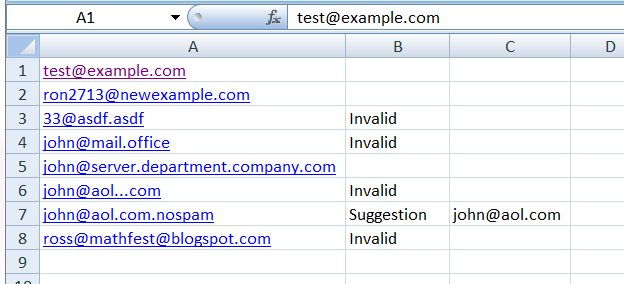
The Excel sheet looks like:
 # see http://www.regular-expressions.info/email.html for discussion about
 # regular expressions to check email addresses
 import re
 emailRE = r"[a-z0-9!#$%&'*+/=?^_`{|}~-]+(?:\.[a-z0-9!#$%&'*+/=?^_`{|}~-]+)*@(?:[a-z0-9](?:[a-z0-9-]*[a-z0-9])?\.)+(?:[A-Z]{2}|com|org|net|edu|gov|mil|biz|info|mobi|name|aero|asia|jobs|museum)\b"
 for i in range(1, 100):
   currCellValue = Cell(i,1).value
   if currCellValue == 0:
     break
   try:
     m = re.match(emailRE, currCellValue).group(0)
     if m == currCellValue:
       # matches full address
       Cell(i,2).value = ""
       Cell(i,3).value = ""
     else:
       # matches part of address
       Cell(i,2).value = "Suggestion"
       Cell(i,3).value = m
   except:
     # no match
     Cell(i,2).value = "Invalid"
     Cell(i,3).value = ""
and once finished, columns B and C are filled in
I am a novice programmer in this environment, so I hope there are no glaring newbie mistakes and that the example is illustrative.
IronSpread installs a Python editor,
IDLE, and a command shell which can be used to test your work. I still love
Sublime Text 2 as an editor, so give a command like:
execfile("c:/Users/Ross/Documents/EmailAddresses.py")
in the shell to run the program saved by Sublime. Any print statements will output to the shell. I have linked to the Excel Sheet and Python program above if you want to try them out.